Product guides
Configure campaign questions and settings
Control interview structure, goals, timing, reminders, and participant-facing language.
Open the campaign settings
Open a campaign and choose Settings. Review the name, description, status, and interview configuration. Use Save changes to persist edits. If you navigate away with changes, the app may prompt you to save or discard them.
A draft is the time to finalize the interview. Launching locks its questions and AI settings. Locked controls on an active campaign are intentional; they keep the interview configuration stable for participants.
Fixed questions and AI follow-up
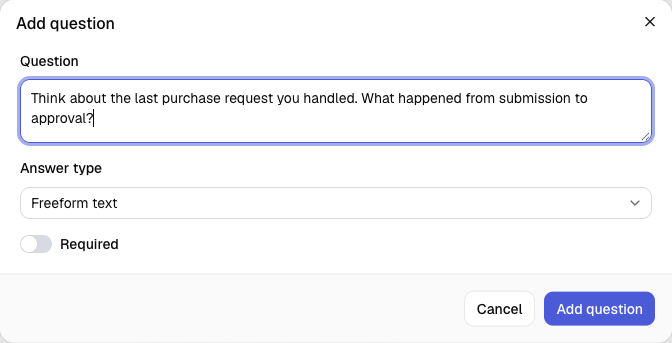
Fixed questions run in the order shown. Add a question, choose its answer type, and review whether it is required. Supported types are Freeform text, Single choice, and Multiple choice. Choice questions have answer options; an “Other” text option can be enabled when appropriate.
Reorder or remove questions while the draft is editable. Use neutral wording and keep one topic per question. Preview the wording as a participant would read it.
With fixed questions, AI follow-up questions allows exploration of the campaign goals after those questions. With no fixed questions, the interview uses AI-generated questions. Check the estimated duration and goals together so the intended scope is realistic.
Duration and reminders
The AI interview duration control ranges from 5 minutes to 2 hours, in five-minute steps. It guides interview length; it is not a countdown or a guarantee that every participant will finish in that time.
Reminder interval controls how many full days pass after an invitation or reminder before an unfinished interview appears as due for a reminder. The default is three days and the supported range is one to thirty days. Becoming due does not mean you have already sent the reminder; review the participant action and its confirmation.
Goals and participant-facing language
Use Priority outcomes to describe what the discovery should establish. Keep them specific enough to assess later.
Review Privacy language and Consent purpose with your organization's project owner. Describe the actual use of responses and intended audience. Do not promise anonymity or confidentiality that your organization has not established: authorized campaign users can review participant information and interviews.
Campaign status
Use draft for preparation and the launch action when ready to invite people. Completed and archived campaigns stop accepting interviews. Finishing a campaign can involve saving transcripts; a Saving transcripts state indicates that this work is still underway.
Do not close a campaign while people are still expected to respond. Coordinate the end of collection, wait for pending saves to finish, and then generate the report you intend to review or share.